

AIWallRun Team · Published 2026-11-01
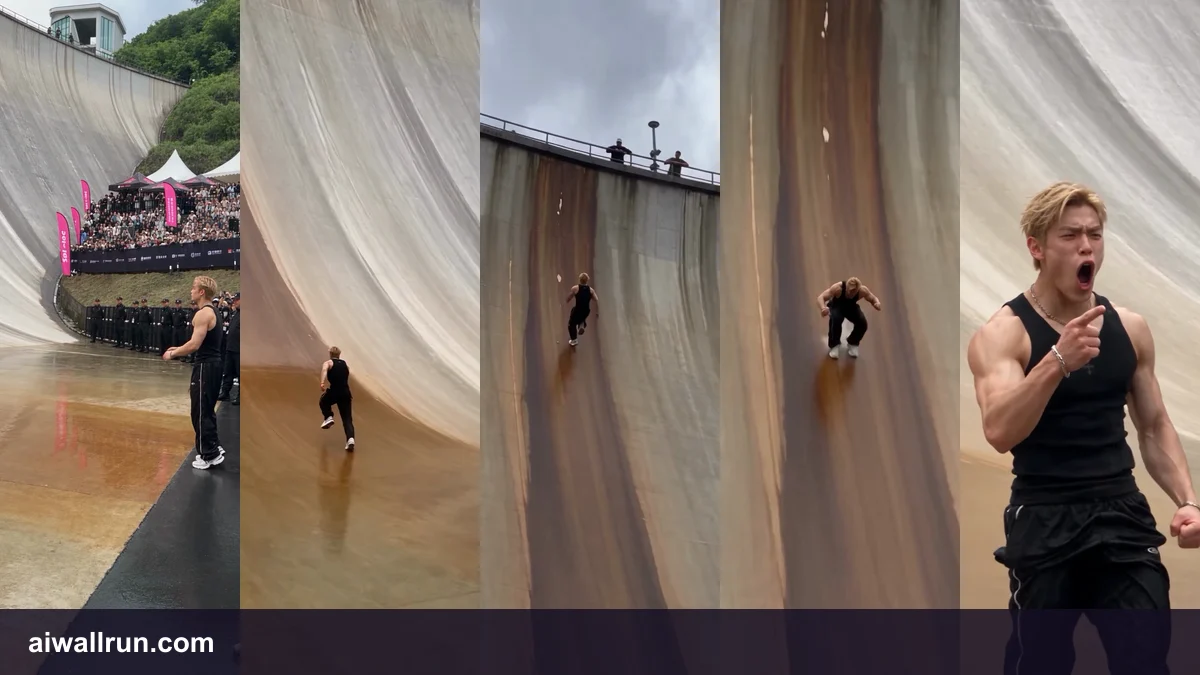
How to Make an AI Wall Run Video: Step-by-Step Guide
The AI wall run is one of the most shared AI video formats of October 2026: a runner sprints up a giant curved dam wall in front of a crowd, flips at the very top and lands back on the wall in one continuous shot. This guide shows you how to make your own version from a single photo, what to check before you post, and how to fix the most common problems.
You do not need editing skills, a green screen or a prompt. You need one good photo, a few minutes and a clear idea of what the finished clip should look like.
What You Are Making
Before you start, it helps to know the shape of the video, because every choice below serves it.
- The scene: a huge concrete dam with a curved face. It starts as a gentle slope at the bottom and bends toward vertical near the top. A grandstand full of spectators sits at the base, with a line of guards in front.
- The action: the runner starts near the guards, sprints up the wall as it gets steeper, flips above the railing at the crest, lands back on the wall in a burst of spray and slides down toward the camera.
- The camera: one vertical handheld take. It follows the run up, tilts toward the sky for the flip and comes back down for a close-up of the runner at the end.
- The format: 9:16 vertical, 15 seconds, sized for TikTok, Instagram Reels, YouTube Shorts and X.
Only one thing changes in your version: the runner gets your face, hair and build. Everything else stays fixed, which is why the result is instantly recognisable as the trend.
Step 1: Choose the Right Photo
The photo is the only input, so it decides most of the quality. In the wide shots the runner is a small figure on a huge wall; at the end the face fills the frame. Your photo has to work at both sizes.
A good photo has:
- One person only. Group photos confuse the face swap.
- A front-facing face. Looking at the camera, both eyes visible.
- Even light. Daylight or soft indoor light; no hard shadows across the face.
- Nothing covering the face. No sunglasses, masks, hands or hair over the eyes.
- Sharp focus. A clear phone photo beats a heavily filtered or compressed one.
If you are using a photo of someone else, ask them first. Our Acceptable Use Policy requires consent for every real person you upload.
For a deeper checklist with examples of photos that fail, read our AI wall run photo tips.
Step 2: Upload and Pick Length and Quality
Open the AI Wall Run generator and upload your photo in the generator section. Then choose:
- Length: 15 seconds. A longer clip gives the landing and close-up more room.
- Quality: 480p or 720p. Higher quality costs more credits but keeps the face sharper in the close-up.
The credit cost appears before you generate, so you always know what the video will cost. You can compare all options on the pricing page.
Step 3: Generate
Tick the consent box, then click Generate AI Wall Run Video. Generation usually takes 2–5 minutes. You do not need to keep the page open; the finished video is saved to your library.
Step 4: Check the Result Before You Post
AI video can slip on fast motion, so watch the full clip once at normal speed and once while pausing at key moments.
| Moment | What to check | If it looks wrong |
|---|---|---|
| Start, near the guards | The runner looks like your photo; the guards stay the same people | Generate again |
| Sprint up the wall | Arms and legs stay attached and in proportion | Generate again; try a sharper photo |
| Flip at the crest | One smooth rotation, no extra limbs | Generate again before changing the photo |
| Landing and slide | Spray starts at the feet when they touch the wall | Generate again |
| Close-up at the end | The face is sharp and recognisable | Use a higher-resolution, front-facing photo |
Motion varies from one generation to the next. If a single moment breaks, one more try often fixes it. If the face itself looks wrong in every try, the photo is the problem.
Step 5: Download and Post
Download the MP4 and post it natively; uploading the file usually looks better than sharing a link.
- TikTok, Reels, Shorts: the 9:16 file fits without cropping.
- X: upload the MP4 directly so it autoplays in the timeline.
- Caption ideas: "Me vs. the dam" · "Gravity who?" · "Made my own AI wall run."
Always label it as AI. These clips look real enough that people ask in the comments whether they are. Turn on your platform's AI label (TikTok's AI-generated content toggle, for example) and add #AI or #AIvideo to the caption. It keeps your account in good standing and it is simply honest.
Common Problems and Fixes
The face does not look like me. Use a closer, front-facing photo with even light. Side angles and small faces in the frame give the model little to work with.
The flip looks broken. Fast rotation is the hardest part for AI video. Generate again first. If it keeps happening, switch to a sharper photo.
The close-up is blurry. Choose a higher quality setting and a higher-resolution photo.
Background people change. Small changes in a big crowd are normal, but if the guards swap places or someone copies the flip, generate again.
Ideas for Your AI Wall Run
- Put a friend on the wall for their birthday (with their permission).
- Make a "real or AI?" post and reveal the answer in the comments.
- Pair it with our other parts of the trend: the dam sprint AI scene and the wall run flip AI moment.
Want to know where this all started? Read the AI Wall Run trend explained.
FAQ
How long does it take to make an AI wall run video?
Uploading takes a minute and generation usually takes 2–5 minutes. You can leave the page while it runs.
Do I need to write a prompt?
No. The AI Wall Run template already contains the scene, the stunt and the camera move. You only upload a photo.
Can I make an AI wall run video on my phone?
Yes. The site works in mobile browsers, and the finished 9:16 MP4 downloads straight to your phone.
Should I label my AI wall run video as AI?
Yes. Turn on your platform's AI label and add #AI to the caption so viewers know it is not a real stunt.
Make Yours Now
One photo is all it takes. Make My AI Wall Run →